

Turn Excel Data into Actionable Insights – Instantly
As a Business Controller or CFO, you work with numbers daily — but extracting meaningful insights and next steps from those numbers can be time-consuming. This AI Powered Excel macro helps you accelerate that process. All with personalized prompts and your data secure, based on your own API and ChatGPT account.
With a simple keyboard shortcut (Ctrl+Shift+I), you can trigger a direct analysis of your selected Excel cell(s) using ChatGPT’s AI engine, returning clear, actionable suggestions for improving company performance. This can be monthly data comparisons to previous months and budget or any other structured data. Personalization can be applied to both data structure, prompting and output.
Example: You see a P&L with monthly data, previous month and budget values for Consultants row. Run the macro to get the automated response from AI in a message box. You can apply this to both Actuals, Bugdet or variance cells as shown below:
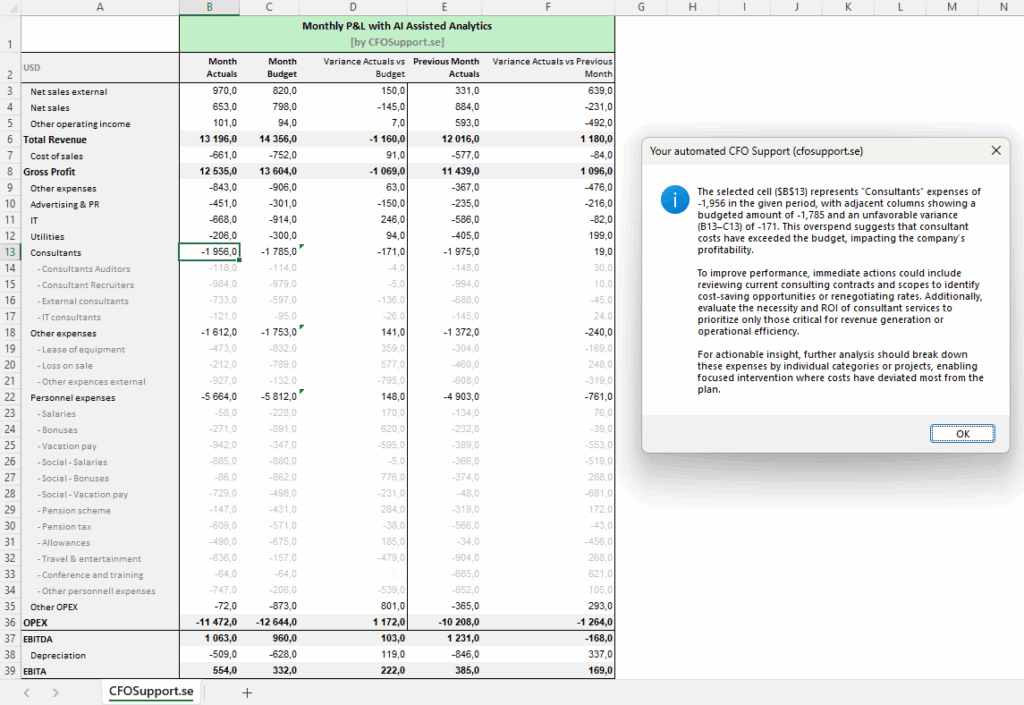
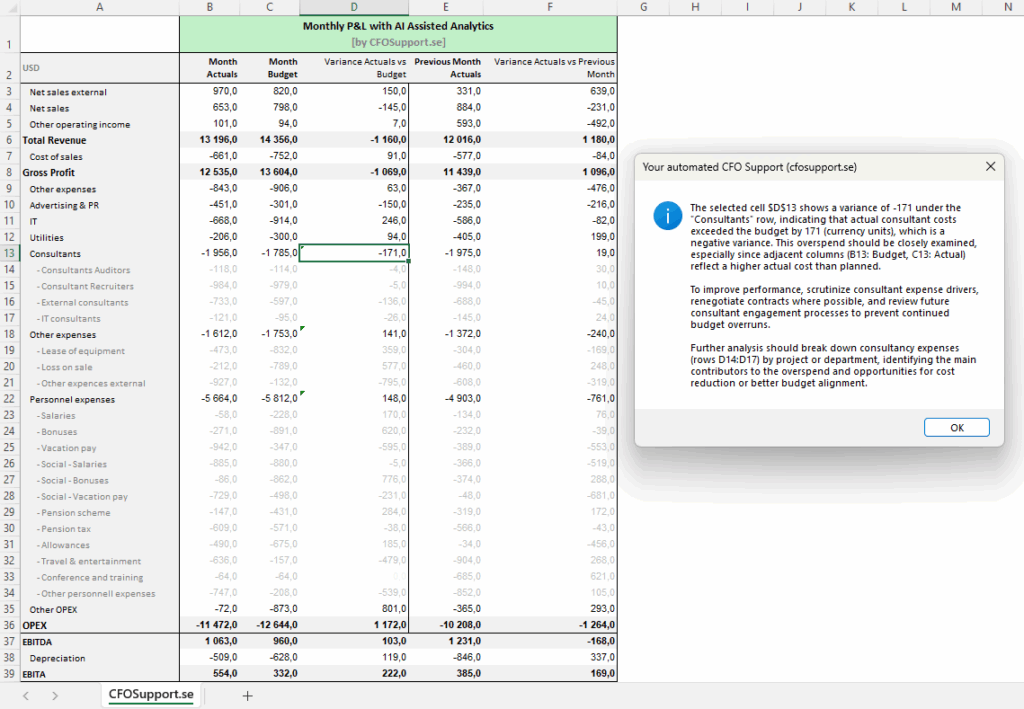
From cost efficiency to revenue drivers, the macro helps you focus on what matters most—strategic insights and data-driven decisions.
Key Benefits for Finance Leaders:
- 🔍 Instant Insights: Analyze any selected cell range with just a keystroke
- 📊 Performance-Focused: Identify trends, risks, and opportunities—fast
- 📈 Actionable Output: Get suggestions for improving financial KPIs, all based on P&L headers
- 🔁 Flexible: Works across any Excel structure or open workbook, not only the one with the macro
- ✏️ Customizable Prompt: Easily tailor the analysis to match your specific business goals, terminology, or focus areas. You can add more detailed data for more detailed insights.
What You Need to Get Started:
- ✅ OpenAI API Access: The macro uses the ChatGPT API to process and return insights.
- Requires an OpenAI account with API credits (very low cost; often just a few cents per use).
- We’ll assist you with setup—no technical expertise needed.
- ⚙️ Custom Prompt (Optional): The default prompt delivers broad business analysis, but we recommend fine-tuning it based on your role, industry, or reporting structure to maximize relevance.
Ideal Use Cases:
- Monthly performance review
- Cost center and variance analysis
- Profitability deep dives
- Strategic planning support
- Writing commentary and actionable tasks for teams to improve company performance
You already have the data—now let it work for you.
With this tool, you can move from spreadsheet to strategy in seconds.
Let us help you get set up and customize it to your needs.
Fast. Smart. Insightful. Right inside Excel.
Settings (less than 3 minutes): To setup the file open Alt+F11 for VBA prompt and adjust the API Key obtained from your ChatGPT account in the header of the VBA Script of Module1. Note, paid version of ChatGPT with credits for at least 1M Tokens is suggested.
Add JSON converter by installing and activating VBA JSON Master included in the file archive. Activate VBA reference “Microsoft Scripting Runtime” after importing the ‘JsonConverter.bas’ file to VBA Developer.
Adjust the prompt to ChatGPT if needed directly in the macro code or move it to any sheet for user-enabled dynamic prompts in any cell of the Excel file.